
Getting the most from the Databricks agentic code converter
On 15 October 2026 Databricks made its agentic code converter generally available for SQL. Point it at T-SQL, Snowflake, Redshift, Oracle, BigQuery or Teradata scripts and it writes Databricks SQL. Run it cold and you get a first draft. Give it your conventions, your target schemas and your type rules first, and you get code you can actually ship. This guide is about the second way.
What was released
The converter runs inside the Databricks workspace and is powered by Genie Code, Databricks' coding agent. You create a migration project, add your source .sql files, and it converts them, checking that each output is syntactically valid and semantically equivalent to the source and fixing sections that fail before it writes anything. It is generally available for the SQL target. A second target, notebooks that use the DataFrame API, is in Beta and needs a workspace admin to switch it on.
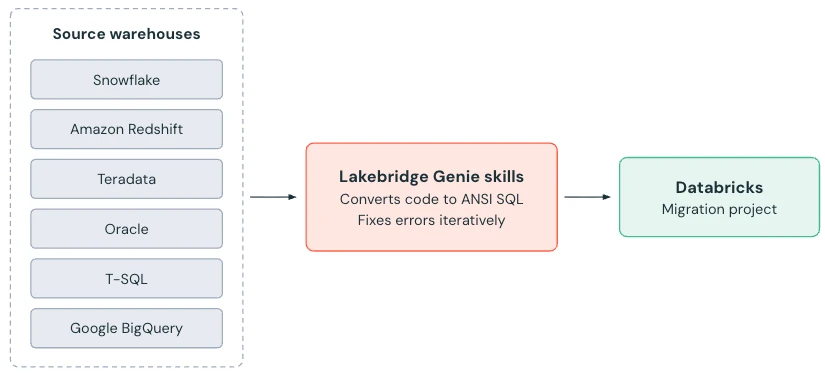
| Source dialects | T-SQL (SQL Server, Synapse), Snowflake, Redshift, Oracle, BigQuery, Teradata |
|---|---|
| Target | Databricks SQL, generally available. Notebooks with PySpark, Beta. |
| Batch size | Up to 300 files per batch |
| Not yet supported | Teradata BTEQ scripts |
| File statuses | Converted successfully, needs review, conversion failed, in progress |
Why a cold run is only a draft
The converter knows SQL dialects very well. It does not know your business. It does not know that your Oracle schema FIN is becoming the Unity Catalog schema prod.finance, that your team never uses SELECT * in production, that a column called MYDATE is a home-grown type that must become a timestamp, or that empty strings in one source table really do mean "unknown". Each of those becomes a correction in review, repeated in every file that touches it. Across a few hundred scripts, that review is where the weeks go.
Everything in the next section moves that knowledge in front of the agent once, so it is applied to every file automatically.
Prepare the agent before you press Run
1. Run the Lakebridge Analyzer and upload its output
The analyzer reads the source scripts and reports complexity, dependencies and the constructs each file uses. Uploading its JSON output to the migration project shows complexity and a dependency graph inside the project, which is how you pick the pilot set and the conversion order. Converting a view before the tables it reads from is a guaranteed failed validation.
2. Attach a lineage file
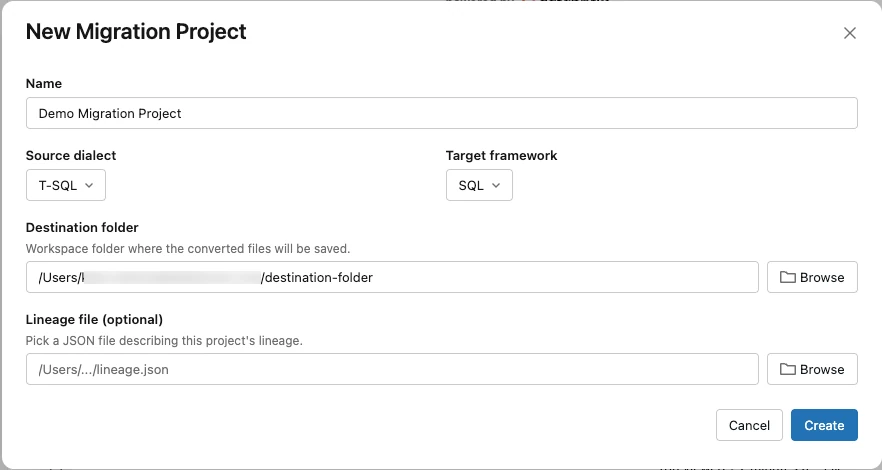
The New Migration Project dialog takes an optional lineage file describing how the project's objects depend on each other. It is optional in the dialog. It should not be optional in your plan.
3. Write workspace instructions for house conventions
Genie Code reads instruction files on every response. A workspace administrator can create .assistant_workspace_instructions.md in the Workspace/ folder, which applies to everyone and takes priority over each user's personal .assistant_instructions.md. The limit is 20,000 characters. Genie Code also picks up AGENTS.md files it finds walking up from the file being worked on, so a migration folder can carry its own rules without changing the whole workspace.
This is where conventions that are not about any one dialect belong. A starting point we use:
# Migration conventions (applies to all converted SQL)
- Always use three-part names: catalog.schema.table. Never rely on a default catalog.
- Never emit SELECT * in views or production queries; list the columns.
- Keep the source script's comments; add one header comment with the source file name.
- Make NULL ordering explicit in every ORDER BY that feeds ROW_NUMBER, RANK or LIMIT.
- Use explicit CASTs where the source relied on implicit conversion; never leave it to inference.
- Replace cursors and row-by-row loops with set-based SQL. If that is not possible, mark the file for review and explain why in a comment.
- Prefer MERGE INTO over DELETE followed by INSERT for upserts.
- Prefer QUALIFY over a subquery that only exists to filter on a window function.
- Prefer built-in functions to scalar UDFs.
4. Build a migration skill with your mappings and target schemas
Skills are folders with a SKILL.md file that Genie Code loads when relevant, or when you @ mention them. Workspace skills live in Workspace/.assistant/skills/ and are shared with everyone; user skills live in your own folder. A skill can carry more than instructions: reference files and even scripts the agent can run, referenced by relative path from the skill folder. That is what makes it the right home for the things the converter cannot guess.
Workspace/.assistant/skills/sql-migration/
  SKILL.md
  name-map.csv        source_schema.table  ->  catalog.schema.table
  type-map.md         custom and edge-case types and what they become
  target-ddl/         CREATE TABLE statements for the Unity Catalog targets
  data-quirks.md      what NULL, empty string and sentinel values mean per table
---
name: sql-migration
description: Rules for converting our Oracle and SQL Server scripts to Databricks SQL. Use for every file in a migration project.
---
# How to convert our code
1. Rename every object using name-map.csv. If a source object is not in the map, stop and mark the file for review.
2. Read the target table's CREATE TABLE in target-ddl/ before writing any INSERT, MERGE or SELECT against it, and match its column names and types exactly.
3. Apply type-map.md. In particular: MYDATE becomes TIMESTAMP_NTZ; NUMBER without precision becomes DECIMAL(38,10) unless the target DDL says otherwise.
4. Oracle sources: an empty string was NULL at the source. Where data-quirks.md says a column relied on that, wrap comparisons with NULLIF(col, '').
5. SQL Server sources: integer division truncated at the source. Where both operands are integers, use DIV or an explicit cast so results do not change.
6. Add a header comment listing every rule above that changed the file.Two things make this pay off. The target DDL means the agent writes against the tables that will actually exist in Unity Catalog, not against a guess shaped like the source. And the header comment from rule six means a reviewer sees at a glance which judgements the agent made, which is most of what a review is for.
For a single rule you discover mid-project, the documentation shows the quick form: ask Genie Code in chat, for example "Always convert our custom type MYDATE to TIMESTAMP_NTZ. Save this as a custom migration skill." Edits to a skill apply to new chats, not ones already open.
5. Run a ten-script pilot and feed what you learn back
Pick ten files from the analyzer's output: a few simple, a few with procedural logic, the one everybody is afraid of. Convert them, reconcile them against real data (below), and write every class of correction you made into the skill or the instructions. Then convert the pilot again from scratch. When a clean rerun needs no hand edits, the setup is ready for the remaining batches. This loop is the single biggest lever on review time, and it is a week of work, not a month.
Running it
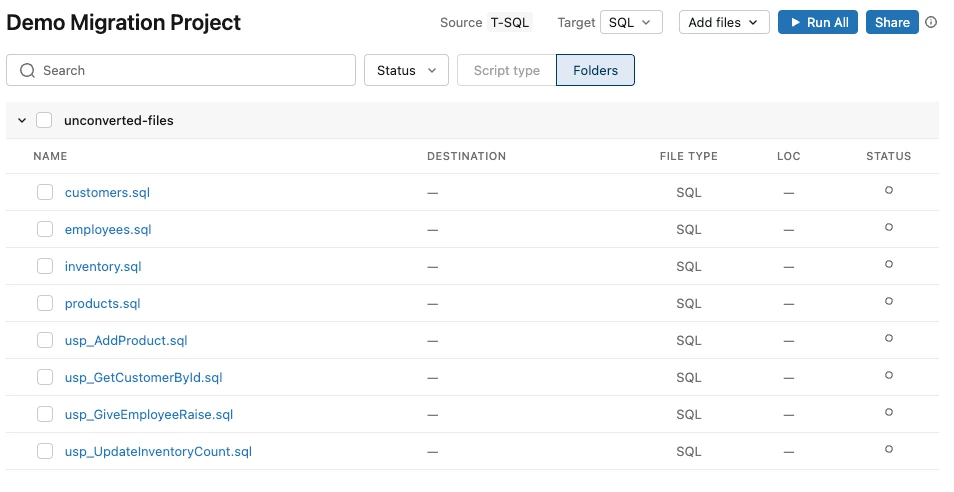
- Upload the source files to the workspace, through the file browser or in bulk with the Databricks CLI.
- New, then Migration project: name, source dialect, the SQL target, destination folder, lineage file.
- Add files. Load the analyzer output if you have it.
- Select files and Run. They convert concurrently, up to 300 per batch.
- Review: for SQL projects you get source and proposed output side by side and accept the whole file or individual changes. Ask Genie Code to re-validate or retry a section that looks wrong.
- Run the converted code on Databricks against migrated data, then reconcile.
For a one-off file outside a project, the /migrate command does the same conversion in the editor.
Six differences no converter can see
Equivalence of the SQL is not equivalence of the results. These live in the data, so they belong in your skill's data-quirks.md and in your reconciliation:
- Empty strings (Oracle). Oracle treats an empty string as NULL; Databricks does not.
WHERE middle_name IS NULLreturns different rows on the same data. - Integer division (T-SQL). In SQL Server
7 / 2is3; in Databricks SQL it is3.5. Ratios built on integer columns move. - NULL ordering. Engines disagree on whether NULLs sort first or last. Any "first row" after an ORDER BY, including
ROW_NUMBER(), can change. - Identifier case (Snowflake). Snowflake upper-cases unquoted names and treats quoted ones as case-sensitive. Scripts that mixed the two worked by accident.
- Dates and time zones. Session time zones, implicit date and timestamp casts, and week-start conventions shift date-bucketed reports.
- Procedural code. Stored procedures, loops, temp tables and transaction blocks are where files land in "needs review". Some should be redesigned as pipeline steps rather than translated.
Reconcile the data, not just the code
The proof is the same numbers from both systems for the same input. Lakebridge has a reconcile component; whatever you use, run these three checks per table and per converted report query, on both sides, and compare:
-- 1. Row counts per partition: dropped or duplicated rows
SELECT order_date, count(*) AS n FROM sales GROUP BY order_date;

-- 2. Totals, distinct counts and NULL counts: type, rounding and NULL drift
SELECT sum(amount) AS total, count(DISTINCT customer_id) AS customers,
       sum(CASE WHEN discount IS NULL THEN 1 ELSE 0 END) AS null_discounts
FROM sales;

-- 3. A hash per row on the business key: the exact rows that differ
SELECT order_id, md5(concat_ws('|', order_date, customer_id, cast(amount AS string))) AS row_hash
FROM sales;
Counts and totals tell you whether there is a problem; hashes tell you where. Schedule them for every day of the parallel run, so a difference shows up the day it appears. Every difference you find becomes a rule in the skill, and the next batch does not repeat it.
A sensible order of work
- Profile and analyze the source. Retire what nobody uses before converting anything.
- Write the instructions and the first version of the skill, including target DDL.
- Pilot ten scripts, reconcile, update the skill, rerun until clean.
- Convert the rest in dependency order, with reconciliation running for every batch.
- Run both systems in parallel, cut over the reports, switch off the source.
When to ask for help
The converter compresses the conversion step dramatically. The preparation, the pilot and the reconciliation are the same careful work they always were, and they decide whether the migration lands on time. If you want those done once, properly, we start with the pilot and give you a written number for the rest when it is done.
Sources: Databricks release notes, October 2026; Convert SQL with the agentic code converter; Genie Code instructions; Extend Genie Code with agent skills; Lakebridge overview. Screenshots and the overview diagram are from the Databricks documentation. Related: Cognos to Databricks, Unity Catalog grants for the migrated tables.
Planning a move to Databricks?
Tell us the source system and roughly how many scripts. We reply within a working day with how we would run the pilot and what the skill would hold.